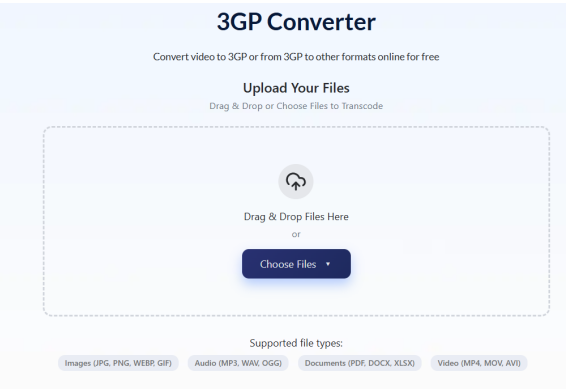
Those short, grainy videos from your old Nokia, the clips your parents sent over MMS in 2007, the WhatsApp videos from your first Android phone — millions of people have these files sitting on hard drives or memory cards, and most modern devices won’t play them without help. They’re .3gp files, and AhaConvert converts them to MP4 in under two minutes, free, with nothing to install. But before you convert, here’s everything worth knowing about what 3GP actually is.
What Is a 3GP File?
A 3GP file is a multimedia video container developed by the 3rd Generation Partnership Project (3GPP) — the international standards body that also built the technical foundations of 3G mobile networks. The format was formally introduced in 3GPP Release 1999 and became commercially widespread between 2002 and 2010.
The engineering goal was specific: create a video format that could be recorded, stored, and transmitted on mobile phones with under 64MB of storage, slow 2G/3G connections, and processors a fraction as powerful as today’s budget smartphones.
A 3GP file contains:
- Video: encoded in H.263, MPEG-4 Part 2, or H.264/AVC
- Audio: encoded in AMR-NB, AMR-WB, or AAC
- Metadata: resolution, duration, creation timestamp
- Timed text: basic subtitle support in select implementations
A typical 3GP clip from a 2005 Nokia phone runs 30–60 seconds at 176×144 pixels and weighs under 1MB. The same footage in modern MP4 would be 5–8× larger — which is exactly why 3GP existed.
How 3GP Works: Container vs Codec
The most misunderstood fact about 3GP is that it’s a container, not a codec. The container is the box. The codec is what’s packed inside.
Two .3gp files with identical extensions can behave completely differently because:
- An older file might contain H.263 video + AMR-NB audio — a codec combination from 2002 that many modern players don’t support
- A newer file might contain H.264 video + AAC audio — which plays on virtually everything
H.263 was engineered specifically for low-bandwidth video calling and mobile recording. It achieved acceptable visual quality at extremely low bitrates — sometimes as low as 64 kbps — making it ideal for 3G transmission but visually limited by modern standards.
AMR-NB (Adaptive Multi-Rate Narrowband) was the audio codec that made voice recording on early phones practical. It compressed speech efficiently but had poor quality for music or environmental sound.
This is why 3GP playback fails: the container is often recognised, but the codec inside isn’t supported.
3GP vs 3G2: The Difference Nobody Explains
Almost no guide covers this — but it directly affects millions of users with old American phones.
3GP was built for GSM and UMTS networks — the dominant mobile standard in Europe, Asia, Africa, Latin America, and most of the world.
3G2 was created for CDMA2000 networks — used primarily by Verizon and Sprint in the United States, and by carriers in South Korea and parts of Japan.
| 3GP | 3G2 | |
| Network standard | GSM / UMTS | CDMA2000 |
| File extension | .3gp | .3g2 |
| Primary regions | Europe, Asia, Africa, most of world | USA (Verizon/Sprint), South Korea, Japan |
| Audio codec difference | AMR-NB/WB standard | May use EVRC or QCELP audio |
| Conversion process | Identical — convert to MP4 | Identical — convert to MP4 |
If you have old Verizon or Sprint phone videos with a .3g2 extension, treat them exactly like 3GP files — the conversion process, tools, and settings are identical.
3GP and WhatsApp: Why Your Old Chats Have These Files
Early WhatsApp versions (2009–2013) transmitted videos as 3GP files because the format’s tiny file size worked within the strict cellular data limits of that era. A 30-second 3GP video could be sent for a fraction of the data cost of an equivalent MP4.
If you’ve exported an old WhatsApp chat backup, the videos inside are almost certainly 3GP format — particularly anything sent before 2014 when WhatsApp shifted to MP4 as smartphones improved.
3GP in Developing Countries: Still Active Today
While 3GP is a legacy format in smartphone markets, it remains in active daily use across parts of Sub-Saharan Africa, South Asia, and Southeast Asia where feature phones are still primary devices.
Manufacturers like Tecno, Itel, and Infinix continue shipping feature phones with 3GP as the default video recording format. In these markets, 3GP’s small file size isn’t a historical limitation — it’s a practical solution for users with limited storage and expensive mobile data.
3GP vs MP4: Full Comparison
| Feature | 3GP | MP4 |
| Designed for | 2G/3G mobile phones | Universal multimedia |
| Typical file size | Under 1MB per minute | 5–10MB per minute |
| Video codecs | H.263, MPEG-4 Part 2, H.264 | H.264, H.265, AV1 |
| Audio codecs | AMR-NB, AMR-WB, AAC | AAC, MP3, AC3 |
| iPhone native support | No | Yes |
| Android native support | Dropped in recent versions | Yes |
| Browser playback | None | Universal |
| YouTube upload | Rejected | Required |
| WhatsApp (current) | Legacy only | Standard |
How to Convert 3GP to MP4 (Step-by-Step)
Converting to MP4 solves every compatibility problem — native iPhone and Android playback, YouTube uploads, WhatsApp sharing, editing software support.
Using AhaConvert (free, browser-based, no installation):
- Open AhaConvert’s free online 3GP converter
- Upload your .3gp or .3g2 file from your device
- Select MP4 as the output format
- Choose H.264 video + AAC audio — maximum device compatibility
- Keep resolution at source — never upscale (explained below)
- Click Convert and download instantly
AhaConvert handles all 3GP codec variants including H.263 video and AMR-NB audio, protects files with 256-bit SSL encryption, deletes them automatically within 24 hours, and requires no account or software.
Recommended settings:
| Destination | Video Codec | Resolution | Audio |
| General playback | H.264 | Match source | AAC 128kbps |
| WhatsApp/sharing | H.264 | Match source | AAC 128kbps |
| YouTube | H.264 | Match source | AAC 192kbps |
| Long-term archive | H.265 | Match source | AAC 192kbps |
The upscaling trap: A 176×144 recording cannot become HD by exporting at 1080p. It becomes a larger, blurrier file with identical detail. Always match source resolution.
How to Open 3GP Without Converting
For immediate playback without conversion, VLC Media Player (free, all platforms) is the most reliable option. VLC includes H.263, MPEG-4 Part 2, and AMR decoders and plays virtually all 3GP variants on Windows, Mac, Linux, iOS, and Android.
Other options: PotPlayer (Windows), KMPlayer (Windows/Android), MX Player (Android).
Frequently Asked Questions
What is a 3GP file?
A 3GP file is a compressed multimedia container format developed by 3GPP in 1999 for video recording and transmission on 2G and 3G mobile phones. It uses H.263 or MPEG-4 video with AMR or AAC audio to keep file sizes under 1MB per minute of footage — small enough for early mobile storage and network transmission. It was the default recording format on Nokia, Sony Ericsson, Motorola, and Samsung feature phones from roughly 2002 to 2012, and early WhatsApp videos were sent as 3GP files before smartphones standardised on MP4.
Why won’t my 3GP file play on my iPhone or Android?
iOS has never supported 3GP natively. Recent Android versions dropped default 3GP support. The core issue is codec: H.263 video and AMR-NB audio — the codecs most common inside 3GP files — aren’t included in standard mobile media decoders. Install VLC for iOS or Android for immediate free playback, or convert permanently to MP4 using AhaConvert for native compatibility on every device without a separate app.
What is the difference between 3GP and 3G2?
3GP was built for GSM and UMTS networks used across Europe, Asia, Africa, and most of the world. 3G2 was built for CDMA2000 networks used by Verizon and Sprint in the USA and carriers in South Korea and Japan. Both formats serve identical purposes and convert to MP4 using the same process and tools. If you have old American Verizon or Sprint phone videos with a .3g2 extension, treat them exactly like .3gp files.
Does converting 3GP to MP4 improve video quality?
No — conversion improves compatibility, not quality. The original recording determines the maximum detail available, and no conversion process recovers information that wasn’t captured. A 176×144 3GP converts to a 176×144 MP4 with identical image quality. Always match the source resolution during conversion — upscaling only increases file size without adding visual detail.
Are 3GP files still used today?
Rarely in smartphone markets, but actively in regions where feature phones remain primary devices. Manufacturers like Tecno and Itel still ship feature phones recording in 3GP across Sub-Saharan Africa and South Asia. In Western markets, 3GP survives mainly as archived files from the 2002–2014 era — old phone recordings, early WhatsApp videos, and MMS message archives.
The Bottom Line
3GP was the format that made mobile video possible — engineered for a world of tiny screens, slow networks, and storage measured in megabytes. Those files still exist in their millions: Nokia family recordings, early WhatsApp clips, MMS messages nobody thought to convert. VLC opens them today, and a reliable 3GP Converter like AhaConvert converts them to universally compatible MP4 in under two minutes — free, with no account, no software, and no quality loss on the original footage.

